Using a script protected by Luarmor and running into a problem? Find your issue below. Script owners should read the script owner troubleshooting page instead. If your issue is not listed, create a ticket in our Discord server. If you want an executor, we recommend Nucleus!

About Luarmor

Luarmor is a service for script owners who want to protect their scripts. It adds a whitelist to a script and obfuscates its code. Luarmor does not make or provide the scripts themselves. You likely came here from a Luarmor Ad Rewards page. If you are having issues with Ad Rewards, this page can help, or you can tell us in our Discord server. For anything else, contact the script owner. Luarmor has many customers and cannot tell you who owns a script, so you must find the script owner yourself.

Getting a key (Ad Rewards)

First, you must complete all checkpoints. Press the START button to begin.
Do not attempt to bypass the key system, or you will be blacklisted.
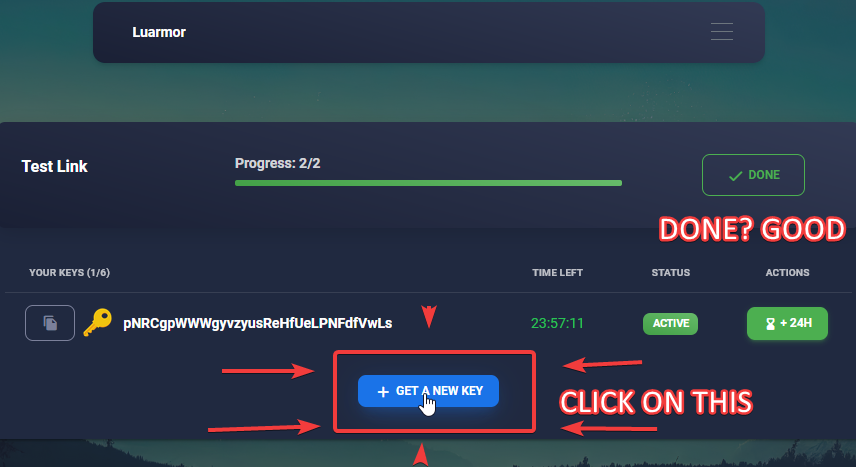
Once you have completed all of the checkpoints, the progress bar is fully green and the button says DONE.Now, press + GET A NEW KEY.Your new key should now appear. Press the copy button to copy it. Put the key above the script’s loadstring, like this (see running the script):
If an error appears, read the rest of this page. If your error is not covered here, create a ticket in our Discord server.Ad reward page with both checkpoints completed and the Get A New Key button highlighted below the existing key
First, you must complete all checkpoints. Press the START button to begin.
Do not attempt to bypass the key system, or you will be blacklisted.
Once you have completed all of the checkpoints, the progress bar is fully green and the button says DONE.If you already have a key, you need to renew it. Under ACTIONS, press the orange RENEW button (on mobile, swipe left on the key first).If you do not have a key, press + GET A NEW KEY.If + GET A NEW KEY looks disabled, you have hit the script’s key limit or have not completed all checkpoints yet. If a cooldown timer shows instead of the Next button, you must wait until it ends before going through the checkpoints again. You have around 70 minutes to complete each checkpoint; after that, your progress resets. See Ad Rewards for visitors for more details.If an error appears, read the rest of this page. If your error is not covered here, create a ticket in our Discord server.
First, you must complete all checkpoints. Press the START button to begin.
Do not attempt to bypass the key system, or you will be blacklisted.
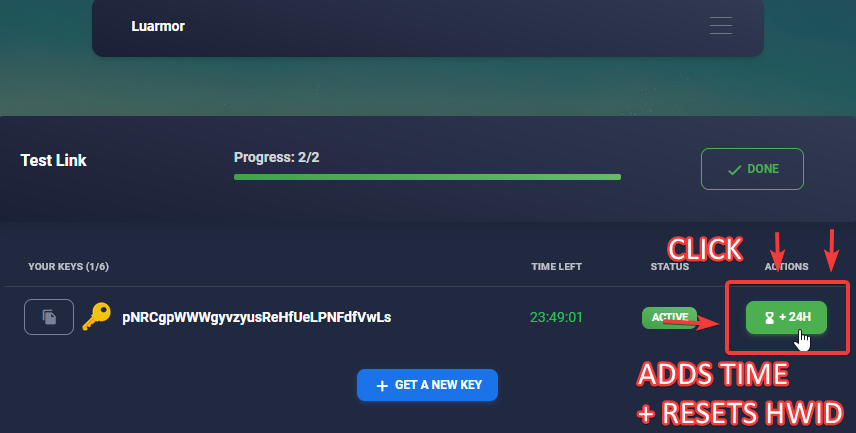
Once you have completed all of the checkpoints, the progress bar is fully green and the button says DONE.Under ACTIONS, press the green button with an hourglass symbol labelled +xH (e.g. +6H; the script owner sets the duration). On mobile, swipe left on the key first. This button adds time to your key and resets your HWID.If the button is not there, the script owner has disabled it and you must contact them for help.Ad reward page with the green +24H button highlighted, which adds time to the key and resets its HWID
There is a problem with target redirection, therefore your result can not be verified at the moment. You can create a ticket in gg/luarmor and send this screenshot. You can also try incognito tab to fix it.
If you get the error above, try the following steps:
1

Try again in a private/incognito tab

As the error suggests, complete all of the checkpoints again in an incognito or private tab. If you do not know how to open one, search for your browser’s instructions on Google.
2

Try another device

If the previous step did not work, try again on another device. For example, use a different computer or phone.
3

Try another network

If a different device did not help, try again on mobile data first, then with a VPN. Note that VPNs can cause problems on ad pages (see Ad Rewards for visitors).
4

Use a different script

If none of the above worked, it’s possible that the script you want to use has not been configured correctly. Try contacting the script owner. If multiple people consistently have the same issue, the script owner needs to fix it.However, if you are the only one with this issue, nothing more can be done. In that case, try a different script.
You need to connect your discord account to perform this action. Please reload the page.
As the error says, reload the page and you will be asked to connect your Discord account. For why you are asked to do this, and whether it is safe, see the Anti-Bypass Policy.If that does not work, follow these steps:
1

Reload the page

Reload the page. It should take you to the Discord website.Do not press anything else.
2

Copy the link

While on the Discord site, copy the link you were redirected to.
3

Send the link on Discord

Open Discord and paste the link into any chat.
4

Open the link

Open the Discord link from inside the Discord app. This should ensure Discord recognises your account.

Blacklisted (Ad Rewards)

You were temporarily blacklisted from all Luarmor ad links for one of the following reasons:
  • Bypass service: you were detected using a bypass service on the ad links. Notable examples include:
  • Userscript or plugin: a userscript or plugin that is known for bypassing ad links was detected on the Luarmor page. Notable examples include:
  • Bypassing a link created by the Luarmor ad system: if you bypass any links created by the Luarmor ad system, you may get blacklisted. These links include, but are not limited to:
For more details on how bypass detection works, see the Anti-Bypass Policy.
If a userscript or plugin is detected, the blacklist is valid whether or not you used it.
A Luarmor blacklist applies to all Luarmor ad links, not just the one you bypassed. This means that even if you try again with a different script, you will still be blacklisted.You must wait until your blacklist ends before completing any other links, or you will be blacklisted again.
When blacklisted, your IP address and current browser session are also blacklisted. It’s possible that another person in your household, or another user of your VPN, got you blacklisted. In this case, the blacklist is still valid.Do not make a ticket; wait for the blacklist to end instead.
If you were blacklisted, it was most likely not a mistake. Do not ask to be unblacklisted unless you are 100% sure that you did nothing wrong.Luarmor has state-of-the-art bypass detections, and we can easily tell when someone attempts to bypass. If you did bypass and then make a ticket asking to be unblacklisted, you may be banned from making tickets.If you keep getting blacklisted after your blacklist has expired, even though you are completing the links legitimately, try another script. The script owner might have set something up incorrectly. If a different script works, contact the owner of the first script.If you wish to appeal, make a ticket in our Discord server with a screenshot of the blacklist message. Make sure that the error code is visible.
You must wait until your blacklist ends.While you are blacklisted, you can try looking for other scripts that do not use the Luarmor key system.

Running scripts

Keys are linked to your HWID. Sharing a key with someone else won’t work, because they will have a different HWID.If your HWID changed on its own, reset it and re-execute the script. Your new HWID will be automatically assigned to the key. You can reset it with the Reset HWID button on the script owner’s Discord bot panel, or through the ad rewards page if you got your key from there (see “How to reset my HWID?” above).If neither option is available, the script owner has disabled HWID resets and you must contact them for further help.
This only applies if you are kicked while running the script, not to blacklists from the ad rewards page.
If the blacklist is permanent and tells you to appeal within the Luarmor Discord, this is because your IP address is blacklisted. In this case, if you are on a VPN, turn it off and on to change your IP address. If you are not on a VPN, and you truly believe it is a mistake, make a ticket in the Luarmor Discord server.In all other cases, the script owner is the only person who can unblacklist you. Luarmor staff cannot unblacklist a project-based blacklist placed either automatically or by the script owner. Please contact the script owner instead. It is also possible that your HWID is banned on another key, while your actual key is not banned. Again, talk to the script owner about this.
This is not an issue with Luarmor. Please contact the script owner.
If the script crashes when you execute it, this is usually an issue with the script itself. To check, try another executor. If it still crashes, please contact the script owner and let them know.This is not an issue with Luarmor. Please contact the script owner.
If the developer console shows the script stuck on 95% Finalizing, try executing it a few more times. This is caused by the executor, usually Xeno.If it keeps happening, use a different executor, such as Nucleus, a safe, keyless executor with 100% sUNC/UNC.
HTTP errors in the console or kick message mean there is a problem with your internet connection. To fix the issue, use a VPN or try a custom DNS like 1.1.1.1.
This error happens when you use a bad HWID spoofer. If you are on an emulator, use a different executor or regenerate your HWID.On Windows, follow these steps:
  1. Press the Windows (⊞) key
  2. Type cmd
  3. Right-click Command Prompt
  4. Press Run as administrator
  5. Copy and paste the following command, and press Enter to run it
  6. Restart Roblox and your executor
This is caused by a broken websocket implementation in your executor.To fix this, either:
  • Use a different executor
  • Ask the script owner to disable the “Heartbeat” feature in their script

Miscellaneous

Create a ticket with full details and proof, as described in how to report a scam server.
If you are an executor developer who wants to add support for your executor or report a way to detect Luarmor, see Executor developers.