> ## Documentation Index
> Fetch the complete documentation index at: https://luarmor.mintlify.site/llms.txt
> Use this file to discover all available pages before exploring further.
# Troubleshooting for Script Owners
> Answers about purchasing, accounts, uploading scripts and the Discord bot
This page answers common questions from script owners who protect their scripts with Luarmor. If you are trying to use someone else's script, read the [script user troubleshooting page](/troubleshooting/script-users) instead. If your issue is not listed, create a ticket in our [Discord server](https://discord.gg/luarmor).
## Getting started
Read the following guides:
* [Quickstart guide](/quickstart)
* [Ad rewards guide](/features/ad-rewards)
* [Discord bot guide](/discord-bot)
## Purchasing
To buy an invite code and create your account, see [Creating your account](/quickstart#creating-your-account).
Luarmor support can only help with invite codes and other purchases made through the [official Luarmor crypto store](https://luarmor.net/crypto). If you bought from anyone else, such as a reseller or another website, we cannot help with any issues. Contact the support of whoever you bought from instead.
Crypto payments from [the official site](https://luarmor.net/crypto) can take 10-60 minutes.
Make sure you send the exact amount, accounting for fees.
If you send insufficient funds, you will get an email about it.
In that event, make a ticket and we can invite you manually.
It costs \$120 USD per month and can only be paid in crypto.
Luarmor does not sell lifetime plans under any circumstances.
However, you can buy invite codes in bulk, for example to cover a whole year.
Please make a ticket if you want a discount on bulk invite codes.
## Account management
Check your inbox (and spam folder) for an email from Luarmor.
If you cannot find it, request it by emailing [contact@luarmor.net](mailto:contact@luarmor.net).
Email [contact@luarmor.net](mailto:contact@luarmor.net) to:
* Reset your API key
* Change your email address
* Change your linked Discord ID
* Reset your [Source Locker](/features/source-locker)
To delete your account, create a ticket in our [Discord server](https://discord.gg/luarmor).
## Uploading scripts
While Luraph supports Luau fully, Luarmor does not.
Therefore, you must remove some Luau features from your script before uploading it to Luarmor.
These include:
* Type annotations
* Inline ternaries using `if` expressions:
```lua theme={null}
-- this does not work
local maxValue = if value > 10 then 10 else value
-- instead, use:
local maxValue
if value > 10 then
maxValue = 10
else
maxValue = value
end
```
For more information, see the [Luau syntax documentation](https://luau-lang.org/syntax).
A web version of darklua is available in the [darklua playground](https://darklua.com/try-it/?configuration=%7B%22rules%22%3A%5B%22convert_luau_number%22%2C%22remove_comments%22%2C%22remove_compound_assignment%22%2C%22remove_interpolated_string%22%2C%22remove_if_expression%22%2C%22remove_types%22%5D%7D).
Paste your code into the left box.
Press the **Configure** button, then press the **format** button on the left panel.
Press `CTRL + A` to select all, then `CTRL + C` to copy, instead of manually selecting the code.
Copy the code from the right box and paste it into Luarmor.
Luarmor adds its own code before obfuscation, which changes the line count.
As a result, line numbers are unreliable.
Projects are like folders for your scripts.
If you have reached your plan's project limit, you need to upgrade your plan.
See [creating a project](/quickstart#creating-a-project).
Note that keys are project-scoped: a user with a key for a project can run every script in that project.
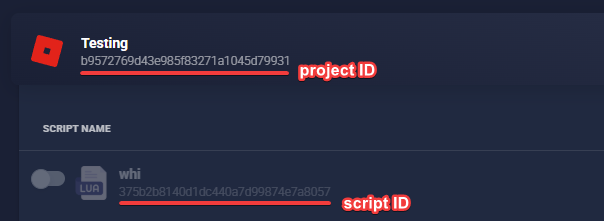
On the dashboard, the project ID is shown under the project name, and each script's ID is shown under the script name in the project's script list.
 Luarmor does not pass on your script's return value, so returning a module at the end of the script does not work.
To fix this, assign your module to a global variable instead.
## Key systems
You can use [this example ad rewards loader](https://github.com/Luckyware-Softworks/Example-Ad-Reward-Loader) as a template.
Yes. Use the [key check library](/scripting/key-check-library) to check a key in Lua before the Luarmor loadstring runs, so users with an invalid or expired key see your own message instead of being kicked.
You can combine it with [`LRM_INIT_SCRIPT`](/scripting/macros#lrm_init_script) to ask for the key before the script runs.
To check keys from outside Roblox, use the [external key check API](/api-reference/external-key-check).
## Running scripts
To test whether it's an issue on your end or Luarmor's, make sure **Silent Mode** is disabled in the script settings.
If the F9 console shows that Luarmor authenticated successfully, the issue is with your script.
If you see a Luarmor error, search these docs for it, or create a support ticket if it is not covered.
This is an issue with your script, not Luarmor.
However, the [script optimisation tips](/scripting/optimisation) may help.
Users whose executor has a broken websocket implementation see this error.
You can disable the **Heartbeat** feature in your [script options](/quickstart#uploading-your-script), or the user can switch executors (see the [script user FAQ](/troubleshooting/script-users#running-scripts)).
This error happens due to obfuscation.
To fix it, call `LPH_NO_UPVALUES` on your `hookfunction`'s hook.
See [`LPH_NO_UPVALUES`](/scripting/macros#lph_no_upvalues) for a before and after example, and what to check if you are still having issues.
## Discord bot
Ensure that you have tried **all** of the available bots listed at [luarmor.net/bot](https://luarmor.net/bot).
If none of them can be added, wait for us to release a new bot.
This error happens when a key's expiration date would overflow the 32-bit integer limit.
Make sure every key expires before 2038.
If you want a key to last forever (lifetime), then do not set an expiration date.
See the `/compensate` command in [manager commands](/discord-bot#manager-commands).
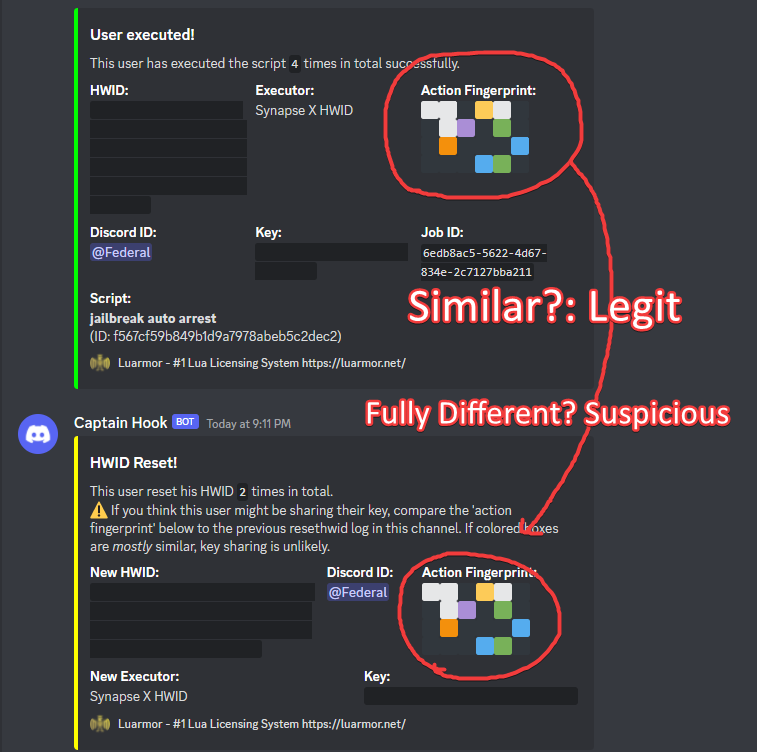
If you think someone might be sharing their key and resetting the HWID on someone else's behalf, compare the action fingerprint in the HWID reset notification with the user's earlier execution and HWID reset logs.
If the colored boxes are *mostly* similar, the reset is probably genuine. If they are completely different, there's a high chance that the user is sharing their key with someone else and resetting the HWID for them.
Luarmor does not pass on your script's return value, so returning a module at the end of the script does not work.
To fix this, assign your module to a global variable instead.
## Key systems
You can use [this example ad rewards loader](https://github.com/Luckyware-Softworks/Example-Ad-Reward-Loader) as a template.
Yes. Use the [key check library](/scripting/key-check-library) to check a key in Lua before the Luarmor loadstring runs, so users with an invalid or expired key see your own message instead of being kicked.
You can combine it with [`LRM_INIT_SCRIPT`](/scripting/macros#lrm_init_script) to ask for the key before the script runs.
To check keys from outside Roblox, use the [external key check API](/api-reference/external-key-check).
## Running scripts
To test whether it's an issue on your end or Luarmor's, make sure **Silent Mode** is disabled in the script settings.
If the F9 console shows that Luarmor authenticated successfully, the issue is with your script.
If you see a Luarmor error, search these docs for it, or create a support ticket if it is not covered.
This is an issue with your script, not Luarmor.
However, the [script optimisation tips](/scripting/optimisation) may help.
Users whose executor has a broken websocket implementation see this error.
You can disable the **Heartbeat** feature in your [script options](/quickstart#uploading-your-script), or the user can switch executors (see the [script user FAQ](/troubleshooting/script-users#running-scripts)).
This error happens due to obfuscation.
To fix it, call `LPH_NO_UPVALUES` on your `hookfunction`'s hook.
See [`LPH_NO_UPVALUES`](/scripting/macros#lph_no_upvalues) for a before and after example, and what to check if you are still having issues.
## Discord bot
Ensure that you have tried **all** of the available bots listed at [luarmor.net/bot](https://luarmor.net/bot).
If none of them can be added, wait for us to release a new bot.
This error happens when a key's expiration date would overflow the 32-bit integer limit.
Make sure every key expires before 2038.
If you want a key to last forever (lifetime), then do not set an expiration date.
See the `/compensate` command in [manager commands](/discord-bot#manager-commands).
If you think someone might be sharing their key and resetting the HWID on someone else's behalf, compare the action fingerprint in the HWID reset notification with the user's earlier execution and HWID reset logs.
If the colored boxes are *mostly* similar, the reset is probably genuine. If they are completely different, there's a high chance that the user is sharing their key with someone else and resetting the HWID for them.
 To stop free (ad rewards) users from getting your premium role, create a separate project just for them.
Remember that keys are project-based.
See [creating a project](/quickstart#creating-a-project) and [Ad Rewards](/features/ad-rewards).
## Executor developers
If your executor is external or uses Xeno as a base, you will not get support.
In this case, your only option is to:
1. Set `identifyexecutor` to return the same as Xeno
2. Use `Xeno-Fingerprint`
3. Set the `User-Agent` the same as Xeno
* Follow the [UNC for the `request` function](https://github.com/unified-naming-convention/NamingStandard/blob/main/api/misc.md#headers), including headers.
* Follow the [UNC for `identifyexecutor`](https://github.com/unified-naming-convention/NamingStandard/blob/main/api/misc.md#identifyexecutor) too.
Each field inside `Roblox-Session-Id` **must** have the value of `game.JobId`.
However, `Roblox-Game-Id` and `Roblox-Session-Id` are optional.
| Header | For `game:HttpGet` | For `request` |
| - | - | - |
| `User-Agent` | `Roblox/WinInet` | `Exploit/Version`, `Exploit Android/Version` or any other value; tell us the value first so we can whitelist it |
| `Roblox-Game-Id` | `game.JobId` | `game.JobId` |
| `Roblox-Session-Id` | `{"GameId": game.JobId, ...}` (as JSON string) | `{"GameId": game.JobId, ...}` (as JSON string) |
WebSocket support is optional but recommended.
Run the [Luarmor compatibility test script](https://github.com/Gork3m/RobloxStuff/blob/main/luarmor_compatibility_test.lua) and make sure everything is successful.
If the script fails at any point, check the F9 console and include its output in your report.
If you are [spoofing another executor](#executor-developers) (for example Seliware), turn it off before running the test. The results you send must use your own executor's headers, otherwise we can't whitelist it.
The previous step should have copied the result to your clipboard.
Paste it into a **support** ticket in the [Discord server](https://discord.gg/luarmor) and we will review it.
Yes. You can spoof an executor that is already supported, such as Seliware. Send that executor's headers on requests to Luarmor, and your own headers everywhere else.
For requests to `luarmor.net` (including subdomains like `api.luarmor.net`):
| Header | Value |
| - | - |
| `Seliware-Fingerprint` | Your HWID |
| `User-Agent` | `Seliware/1.0` |
For every other site, keep using your own `YOUREXECUTOR-Fingerprint` and `User-Agent: YOUREXECUTOR/1.0`.
```cpp theme={null}
// host is the domain the request is going to, e.g. "api.luarmor.net"
bool isLuarmor = host == "luarmor.net" || host.ends_with(".luarmor.net");
cpr::Header Headers;
if (isLuarmor)
{
Headers["Seliware-Fingerprint"] = HWID;
Headers["User-Agent"] = "Seliware/1.0";
}
else
{
Headers["YOUREXECUTOR-Fingerprint"] = HWID;
Headers["User-Agent"] = "YOUREXECUTOR/1.0";
}
```
Turn spoofing off before you request a whitelist. If your compatibility test results contain Seliware headers, we can't whitelist your executor. See [Report the results to us](#executor-developers) above.
First, enable **Silent Mode** in the script and check whether the detection still works.
If it does, report it to us and mention that Silent Mode was enabled.
First, follow ["I want to add support for my executor"](#executor-developers) above so that your executor is supported.
After that, your executor is only eligible for free Luarmor if it is mainly free with ads, meaning users complete ad steps to get a temporary key that lasts 12 hours or more.
If you believe you are eligible, please make a ticket on the [Discord](https://luarmor.net/discord) and include your Discord server invite in this format: `.gg/whatever`.
## Miscellaneous
Most likely not.
Only script owners who mainly use the ad rewards system **and** get over 10,000 completions per day are eligible.
Even then, being eligible does not guarantee that you will get it for free.
If you believe you are eligible, please make a ticket on the [Discord](https://luarmor.net/discord) with proof of your completions, and include your Discord server invite in this format: `.gg/whatever`.
This documentation is built and hosted on [Mintlify](https://mintlify.com), a developer documentation platform.
To stop free (ad rewards) users from getting your premium role, create a separate project just for them.
Remember that keys are project-based.
See [creating a project](/quickstart#creating-a-project) and [Ad Rewards](/features/ad-rewards).
## Executor developers
If your executor is external or uses Xeno as a base, you will not get support.
In this case, your only option is to:
1. Set `identifyexecutor` to return the same as Xeno
2. Use `Xeno-Fingerprint`
3. Set the `User-Agent` the same as Xeno
* Follow the [UNC for the `request` function](https://github.com/unified-naming-convention/NamingStandard/blob/main/api/misc.md#headers), including headers.
* Follow the [UNC for `identifyexecutor`](https://github.com/unified-naming-convention/NamingStandard/blob/main/api/misc.md#identifyexecutor) too.
Each field inside `Roblox-Session-Id` **must** have the value of `game.JobId`.
However, `Roblox-Game-Id` and `Roblox-Session-Id` are optional.
| Header | For `game:HttpGet` | For `request` |
| - | - | - |
| `User-Agent` | `Roblox/WinInet` | `Exploit/Version`, `Exploit Android/Version` or any other value; tell us the value first so we can whitelist it |
| `Roblox-Game-Id` | `game.JobId` | `game.JobId` |
| `Roblox-Session-Id` | `{"GameId": game.JobId, ...}` (as JSON string) | `{"GameId": game.JobId, ...}` (as JSON string) |
WebSocket support is optional but recommended.
Run the [Luarmor compatibility test script](https://github.com/Gork3m/RobloxStuff/blob/main/luarmor_compatibility_test.lua) and make sure everything is successful.
If the script fails at any point, check the F9 console and include its output in your report.
If you are [spoofing another executor](#executor-developers) (for example Seliware), turn it off before running the test. The results you send must use your own executor's headers, otherwise we can't whitelist it.
The previous step should have copied the result to your clipboard.
Paste it into a **support** ticket in the [Discord server](https://discord.gg/luarmor) and we will review it.
Yes. You can spoof an executor that is already supported, such as Seliware. Send that executor's headers on requests to Luarmor, and your own headers everywhere else.
For requests to `luarmor.net` (including subdomains like `api.luarmor.net`):
| Header | Value |
| - | - |
| `Seliware-Fingerprint` | Your HWID |
| `User-Agent` | `Seliware/1.0` |
For every other site, keep using your own `YOUREXECUTOR-Fingerprint` and `User-Agent: YOUREXECUTOR/1.0`.
```cpp theme={null}
// host is the domain the request is going to, e.g. "api.luarmor.net"
bool isLuarmor = host == "luarmor.net" || host.ends_with(".luarmor.net");
cpr::Header Headers;
if (isLuarmor)
{
Headers["Seliware-Fingerprint"] = HWID;
Headers["User-Agent"] = "Seliware/1.0";
}
else
{
Headers["YOUREXECUTOR-Fingerprint"] = HWID;
Headers["User-Agent"] = "YOUREXECUTOR/1.0";
}
```
Turn spoofing off before you request a whitelist. If your compatibility test results contain Seliware headers, we can't whitelist your executor. See [Report the results to us](#executor-developers) above.
First, enable **Silent Mode** in the script and check whether the detection still works.
If it does, report it to us and mention that Silent Mode was enabled.
First, follow ["I want to add support for my executor"](#executor-developers) above so that your executor is supported.
After that, your executor is only eligible for free Luarmor if it is mainly free with ads, meaning users complete ad steps to get a temporary key that lasts 12 hours or more.
If you believe you are eligible, please make a ticket on the [Discord](https://luarmor.net/discord) and include your Discord server invite in this format: `.gg/whatever`.
## Miscellaneous
Most likely not.
Only script owners who mainly use the ad rewards system **and** get over 10,000 completions per day are eligible.
Even then, being eligible does not guarantee that you will get it for free.
If you believe you are eligible, please make a ticket on the [Discord](https://luarmor.net/discord) with proof of your completions, and include your Discord server invite in this format: `.gg/whatever`.
This documentation is built and hosted on [Mintlify](https://mintlify.com), a developer documentation platform.