> ## Documentation Index
> Fetch the complete documentation index at: https://luarmor.mintlify.site/llms.txt
> Use this file to discover all available pages before exploring further.
# Runtime Variables
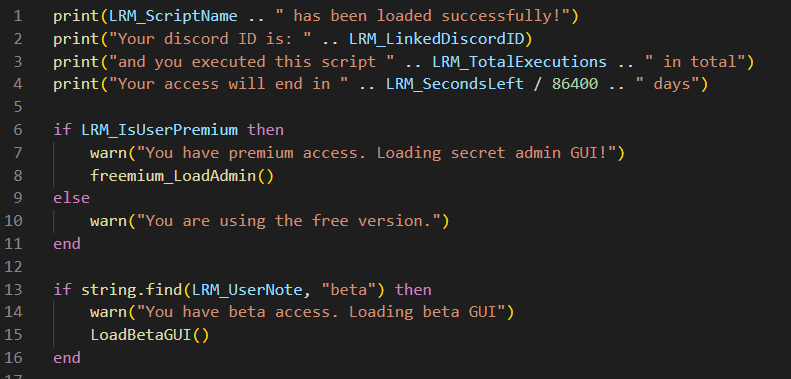
Luarmor has runtime variables that allows you to access to user details such as Discord ID, total executions, script name, premium, user note, etc..
Luarmor does not protect these runtime variables and they can be hooked and modified maliciously.
Make sure to add your own protections, if needed.
Also, they are not updated at all.
You will need to track updates for variables like `LRM_SecondsLeft` **yourself**.
They can be used for a lot of things. Check out this example:
 ## Every runtime variable
You can see a full list of runtime variables here:
A `boolean` indicating if the user is premium or not. This is useful for FFA scripts ('freemium').
The linked Discord ID of the user.
The name of the current script.
The total executions of the user. It will be `0` by default.
The seconds left until expiry. It will be `math.huge` if `auth_expire` isn't set.
The user note. It will be `Not specified` by default.
The version of the script, i.e. `0.0.0.1`.
## Every runtime variable
You can see a full list of runtime variables here:
A `boolean` indicating if the user is premium or not. This is useful for FFA scripts ('freemium').
The linked Discord ID of the user.
The name of the current script.
The total executions of the user. It will be `0` by default.
The seconds left until expiry. It will be `math.huge` if `auth_expire` isn't set.
The user note. It will be `Not specified` by default.
The version of the script, i.e. `0.0.0.1`.