> ## Documentation Index
> Fetch the complete documentation index at: https://luarmor.mintlify.site/llms.txt
> Use this file to discover all available pages before exploring further.
# Source Locker
> Store encrypted backups of your script sources that only you can decrypt
This page explains the **Source Locker** feature, which stores backups of your source code.
By default, Luarmor does not store your source code. With **Source Locker**, you can encrypt your script with a private key and upload it to Luarmor.
If you ever lose the source code on your PC, you can recover all of your sources from the locker. If you need your locker reset, email [contact@luarmor.net](mailto:contact@luarmor.net). Encryption and decryption run entirely in your browser, so the server never sees the raw content.
The diagrams below show how the encryption works.
## Setup process
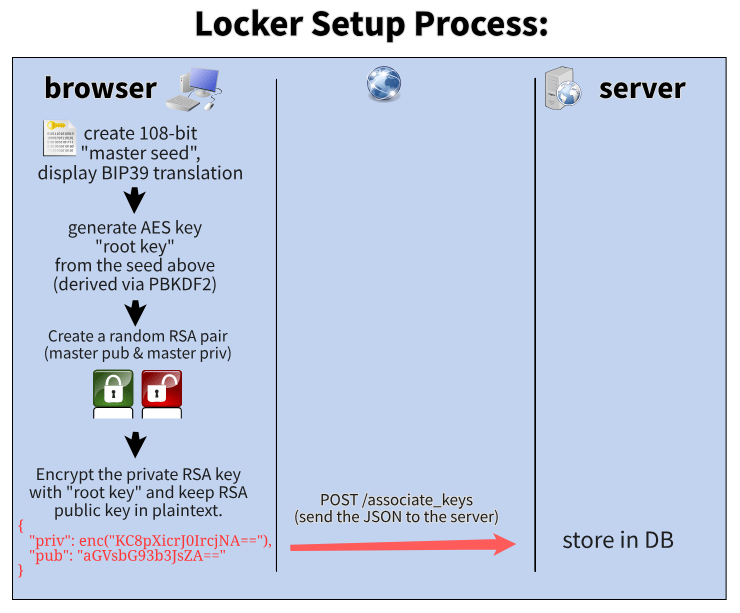 1. The browser creates a 108-bit **master seed** and shows it to you as a BIP39 passphrase.
2. It derives an AES **root key** from the seed with PBKDF2.
3. It creates a random RSA key pair (master public & master private key).
4. It encrypts the private RSA key with the root key and keeps the public key in plaintext.
5. It sends `{ "priv": enc(...), "pub": "..." }` to the server via `POST /associate_keys`, and the server stores it in its database.
This means the private RSA key can only be decrypted with the 108-bit master seed, which is shown to you only once during setup and is never saved in browser storage.
The 108-bit seed is the input to the PBKDF2 derivation, which uses 100k SHA256 iterations. On this page, "AES" means AES-GCM with a 256-bit key. There is also a seeding mechanism involved, but it has no meaningful effect on the process.
## File encryption process
1. The browser creates a 108-bit **master seed** and shows it to you as a BIP39 passphrase.
2. It derives an AES **root key** from the seed with PBKDF2.
3. It creates a random RSA key pair (master public & master private key).
4. It encrypts the private RSA key with the root key and keeps the public key in plaintext.
5. It sends `{ "priv": enc(...), "pub": "..." }` to the server via `POST /associate_keys`, and the server stores it in its database.
This means the private RSA key can only be decrypted with the 108-bit master seed, which is shown to you only once during setup and is never saved in browser storage.
The 108-bit seed is the input to the PBKDF2 derivation, which uses 100k SHA256 iterations. On this page, "AES" means AES-GCM with a 256-bit key. There is also a seeding mechanism involved, but it has no meaningful effect on the process.
## File encryption process
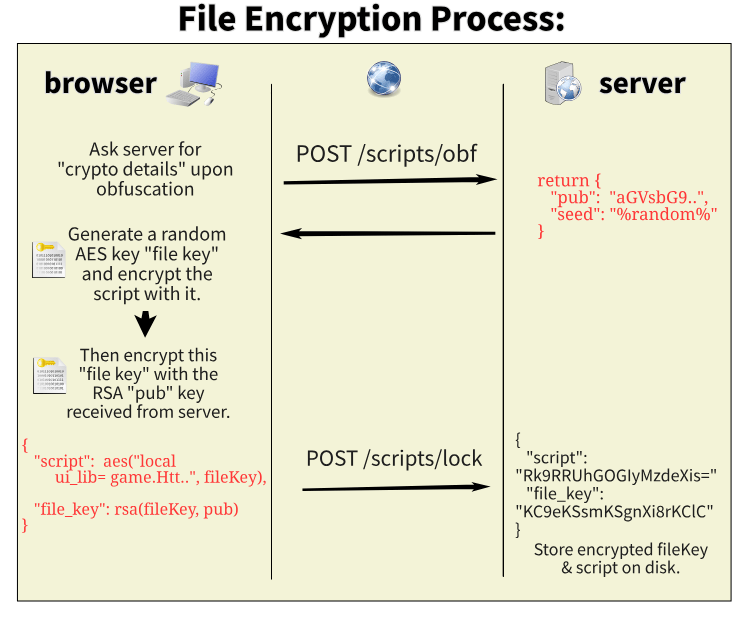 1. When you obfuscate a script, the browser asks the server for "crypto details" (`POST /scripts/obf`). The server returns the RSA `pub` key and a random `seed`.
2. The browser generates a random AES **file key** and encrypts the script with it.
3. It encrypts the file key with the RSA public key.
4. It uploads `{ "script": aes(script, fileKey), "file_key": rsa(fileKey, pub) }` via `POST /scripts/lock`, and the server stores the encrypted file key and script on disk.
The **RSA Public Key** (created during setup) **encrypts the AES-GCM seed**, which is used to **encrypt the actual script data**, including:
* File name
* File size (how many bytes)
* Time
* File content
Metadata and file content are encrypted in the browser, so the server has no way to verify their authenticity. If you share your API key with other people, they can technically manipulate the file name, file content and file size during the upload process, and it will appear "normal" to the server.
## File decryption process
1. When you obfuscate a script, the browser asks the server for "crypto details" (`POST /scripts/obf`). The server returns the RSA `pub` key and a random `seed`.
2. The browser generates a random AES **file key** and encrypts the script with it.
3. It encrypts the file key with the RSA public key.
4. It uploads `{ "script": aes(script, fileKey), "file_key": rsa(fileKey, pub) }` via `POST /scripts/lock`, and the server stores the encrypted file key and script on disk.
The **RSA Public Key** (created during setup) **encrypts the AES-GCM seed**, which is used to **encrypt the actual script data**, including:
* File name
* File size (how many bytes)
* Time
* File content
Metadata and file content are encrypted in the browser, so the server has no way to verify their authenticity. If you share your API key with other people, they can technically manipulate the file name, file content and file size during the upload process, and it will appear "normal" to the server.
## File decryption process
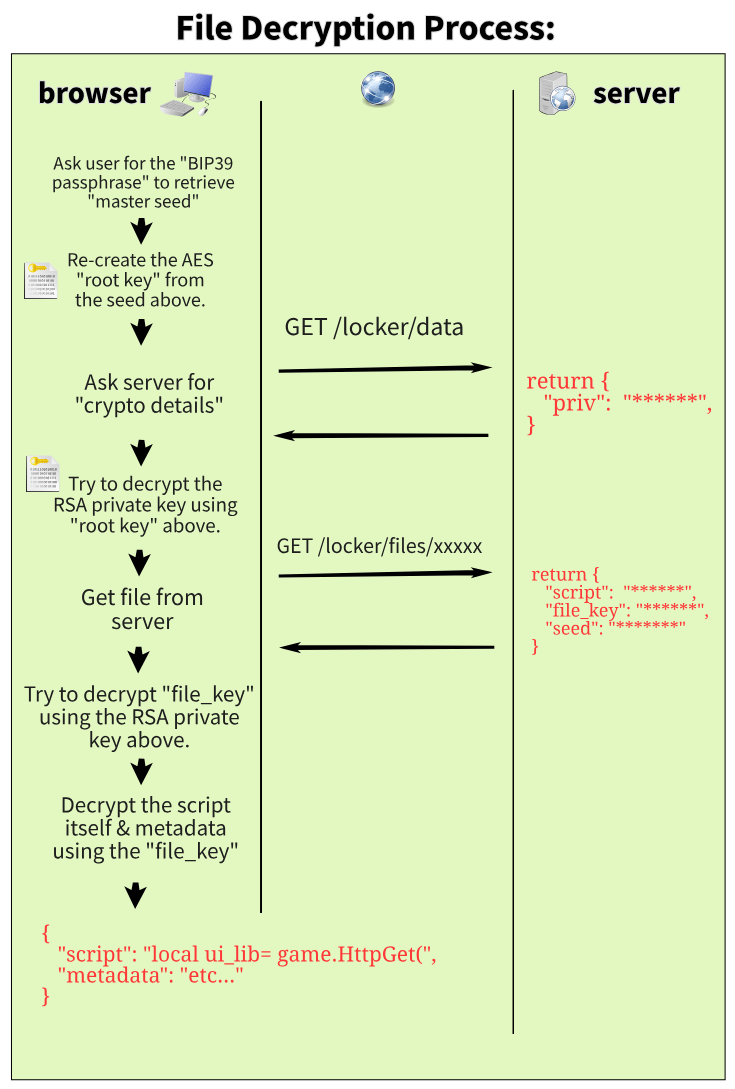 1. You enter your BIP39 passphrase, which gives back the master seed.
2. The browser re-creates the AES root key from the seed.
3. It asks the server for "crypto details" (`GET /locker/data`), which returns the encrypted private RSA key (`priv`).
4. It decrypts the private RSA key with the root key.
5. It fetches the file (`GET /locker/files/`), which returns the encrypted `script`, `file_key` and `seed`.
6. It decrypts the `file_key` with the private RSA key.
7. It decrypts the script and its metadata with the file key.
## Implementation details
The actual implementation is a bit more complicated: a "proof" mechanism and a 2FA check run before the server returns the encrypted file data. Keys are also generated on the fly, so the private key is never kept in browser storage. Instead, the browser stores a "temp\_key" that decrypts the private RSA key, which the server stores in encrypted form.
You can audit the full implementation in [`locker_api.js`](https://luarmor.net/locker_api.js).
This documentation is built and hosted on [Mintlify](https://mintlify.com), a developer documentation platform.
1. You enter your BIP39 passphrase, which gives back the master seed.
2. The browser re-creates the AES root key from the seed.
3. It asks the server for "crypto details" (`GET /locker/data`), which returns the encrypted private RSA key (`priv`).
4. It decrypts the private RSA key with the root key.
5. It fetches the file (`GET /locker/files/`), which returns the encrypted `script`, `file_key` and `seed`.
6. It decrypts the `file_key` with the private RSA key.
7. It decrypts the script and its metadata with the file key.
## Implementation details
The actual implementation is a bit more complicated: a "proof" mechanism and a 2FA check run before the server returns the encrypted file data. Keys are also generated on the fly, so the private key is never kept in browser storage. Instead, the browser stores a "temp\_key" that decrypts the private RSA key, which the server stores in encrypted form.
You can audit the full implementation in [`locker_api.js`](https://luarmor.net/locker_api.js).
This documentation is built and hosted on [Mintlify](https://mintlify.com), a developer documentation platform.